Quick answer
A Polymarket order book lists bids and asks for one outcome token, with a price and size at each level. For a buy, check the best ask and the shares offered there. For a sale, check the best bid. Compare that displayed size with your order, then read the next levels. Recheck before submitting because traders can change their quotes.
What did a 100-market Polymarket snapshot show?
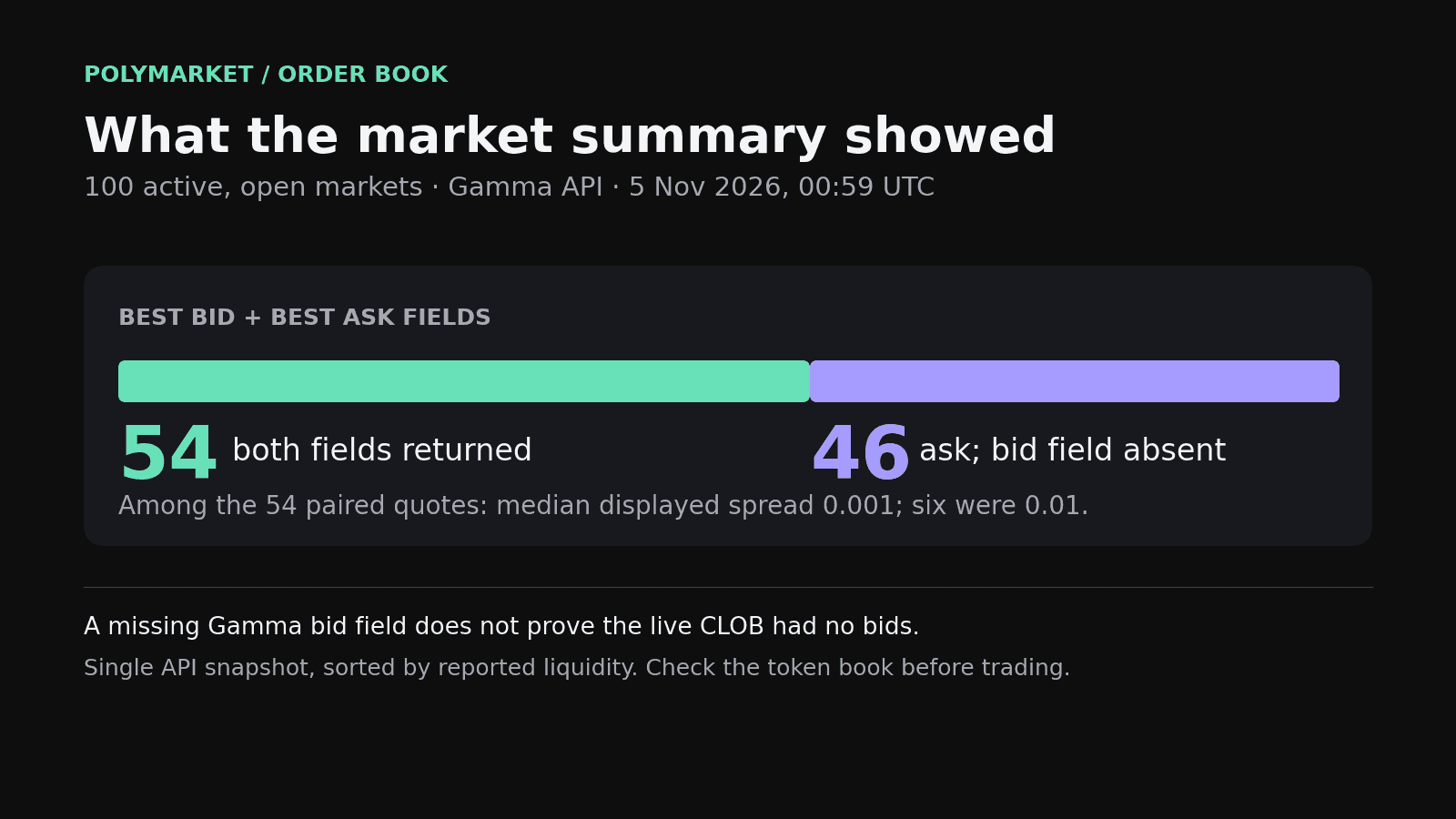
At 00:59 UTC on November 5, 2026, we requested the first 100 active, open Polymarket markets from the Gamma API, sorted by reported liquidity. All 100 were marked as accepting orders. Fifty-four records included both `bestBid` and `bestAsk`. Forty-six included an ask but no bid field. Among the 54 paired quotes, the median displayed spread was 0.001 per share. Six showed a spread of 0.01.
Those 46 records are the reason to open the book. A missing field in a Gamma market summary does not establish that the live CLOB had no bids. Our request captured one API response, and we could not retrieve full CLOB depth during this collection. The chart measures fields returned by Gamma. It does not measure executable size or typical spreads across Polymarket.
Where do you find the order book for one outcome?
Find the token ID for the outcome you intend to trade, then request its CLOB book. A binary market usually has separate Yes and No tokens. The Gamma market record supplies `clobTokenIds`; Polymarket's `/book` endpoint accepts a `token_id` and returns bids and asks with a price and size for each level. The event headline alone does not identify which outcome book you are reading.
| Source | What you can check | What it cannot tell you alone |
|---|---|---|
| Gamma market record | Outcome token IDs and summary best bid and ask fields | Shares available at each price level |
| CLOB /book | Bid and ask prices, sizes, timestamp and tick size for one token | Whether those quotes will still be there when your order arrives |
| Market WebSocket | Book and price updates as they arrive | Your final fill without checking the order result |
What do the best bid and best ask mean?
The best bid is the highest displayed price someone offers to pay for the token. The best ask is the lowest displayed price someone offers to sell it for. A trader who buys immediately looks at the ask; a trader who sells immediately looks at the bid. The gap is the spread. Each price is attached to a finite displayed size.
Take an illustrative Yes book with a $0.42 best bid for 120 shares and a $0.44 best ask for 35 shares. The spread is $0.02 per share. A 20-share buy fits inside the displayed ask size at that instant. An 80-share buy exceeds it by 45 shares. Those remaining shares may reach another price level or stay unfilled, depending on the order and the live book. This is an example, not a recorded trade.

How does order book depth affect your fill?
Depth tells you how many shares are displayed at each bid and ask. If you want more than the first ask offers, read the prices and sizes behind it before choosing an order type or limit. A market's last trade and quoted probability cannot answer that sizing question. They describe a price, not the quantity currently offered at that price.
- Record the shares displayed at the best ask for a buy, or the best bid for a sale.
- Add the size across the price levels you are willing to accept.
- Set a maximum acceptable price for a buy or a minimum for a sale, then check the actual fill.
Polymarket's documented `/book` response includes a timestamp, tick size and arrays of price and size levels. The Gamma summary fields omit those sizes. For the data interfaces, read our Polymarket API guide. Fees also affect the result, so compare the book separately from our Polymarket fees guide.
How can you keep the order book current?
A REST book request gives you one timestamped view. Traders may fill or cancel a quote before your order reaches the market. Polymarket also documents a market WebSocket channel for live book messages. If you build against that feed, handle disconnects and reconcile your local view after reconnecting. Then confirm the order result. A current screen still cannot reserve the liquidity it shows.
When should you compare another venue's book?
Compare venues when the same event appears to trade in more than one place. First check the contract wording, rules and settlement conditions. Then compare the price you can execute for your intended size, including fees. Two headline probabilities are a weak comparison if one book has little size near its best quote. Our prediction market arbitrage guide covers the contract checks in more detail.
Kairos puts venue quotes, charts and execution controls in one terminal so you can inspect the market before submitting an order. It does not make a thin book deep or guarantee a fill. Open Kairos and check the outcome and size you intend to trade.
How did we check the 100 markets?
We queried the Polymarket Gamma markets endpoint at 00:59 UTC on November 5, 2026. The sample is the first 100 active, open records sorted by `liquidityNum` descending, without manual exclusions. We calculated `bestAsk - bestBid` only for records where both fields were numeric. This is a one-time summary-field audit, not a test of live CLOB depth, fills or latency.